Thursday, February 12

Wireshark NPF driver isn't working

Wireshark is an network analyzer. Wireshark depends on another utility process called WinPcap.

If the WinPcap service is not running in the background then we get the error "The NPF driver isn't running.  You may have trouble capturing or listing interfaces."


Solution


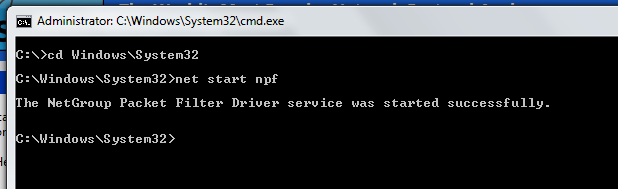
  1. Open Command prompt by right clicking on it  and "Run as administrator".
  2. Goto "cd Windows\System32" directory
  3. Start the "net start npf"
  4. After the success message, Restart the Wireshark

Friday, October 31

Codenameone Flow Order

This is the flow order of functions that is loaded when an application created using codenameone framework starts

 1. ImmuntiyMeterApp.init(Object context)

 2. ImmuntiyMeterApp.start()

 3. StateMachine.initVars(Resources res)

 4. StateMachine.beforeMain(Form f)

 5. StateMachine.postMain(Form f)

 6. StateMachine.StateMachine(String resFile)

Saturday, October 25

The Web Developer's must have Tool - Firebug


Without Firebug i wouldn't have learned the HTML, CSS, Javascript or the working of Web very quickly.

Firebug is a add-on that is available with  firefox browser and a firefox-lite with chrome.

So what is so great about the Firebug? 

1.  Firebug lets you inspect each HTML elements (like <a>, <div>, <table> ...) and when you inspect the element then the element, its margin, padding, border gets highlighted.

2. On inspecting a element, you can also the view the CSS used to style that part. You can also manipulate and tweak the css to view the result on the fly.

3. To see what all resources are loaded when a page is requested.To find out the time taken and the order in which the resource is loaded. To find out the status, url, domain, ip, size and Header info.

4. To debug JavaScript, to trace the stack flow of the script, to break the script and inspect the DOM and other elements at that time.

Tuesday, July 29

Irony of Science in Eid al-Fitr

In today’s world, the science has grown incredibly that we have Hubble Space Telescope  launched into space watching the universe in different spectrums. We have satellites for weather predictions; we have Terrestrial Space observatory Telescope's watching for flares in sun and climate in Jupiter. We have even accurately and safely landed man on the moon. 

We can even accurately predicate solar and lunar eclipse, the exact points in earth where it would be visible. We have even predicated the next arrival of Halley's Comet  and also the distance away from the earth. The next arrival of Halley's Comet is on 28th July 2061, and then on 7th May, 2134  and it will pass within 13.9 million km from earth.

Halley's Comet May 29 1910


In spite of all these feats, we still haven’t been able to predicate accurately the Eid al-Fitr. In India, all banks and govt office calendars marked 28th July as Eid al-Fitr holiday but it was predicted a day earlier.

The date of Eid al-Fitr for a region is confirmed by the sighting of the new moon.in that particular region. In countries like India, where even the whole nation has same time-zone can't still predicate when the new moon will occur.

Saturday, July 26

How much is the Advertisment Revenues in Media


Advertisment is the primary revenue for most media.


Industries that are spending  in online medium.
  • Electronics
  • Fashion - Men
  • Fashion - Woman
  • Baby Care
  • Video Games
  • Fitness
  • Health Care
  • Car
  • Bike
  • Jewellery
  • Dating

Sunday, July 13

To insert debug code in all functions using regular expression


Lets illustrate with a Javascript  Source Code and Notepad++ IDE

Regular Expression to Find functions

((\w*)\s*[:|=]\s*function\(\w*\)\s*\{)

Debug Code to insert inside each functions

console.log("functionName");

Regular Expression to Insert Debug Code inside Functions

$1 \n\tconsole\.log\("$2"\)\;

Note: Please enable "Regular expression" and ". matches newline" in Search Mode in Replace box in Notepad++ for inserting inside more than 1 function using regular expression.


A sample Javascript before inserting Debug code

var SyntaxHighlighter = function() {
    var sh = {
        all: function(params)
        {
            attachEvent(
                window,'description'
            );
        }
    };
}();

Javascript code after inserting Debug code using Regular Expression

var SyntaxHighlighter = function() {
      console.log("SyntaxHighlighter");
    var sh = {
        all: function(params)
        {
            console.log("all");
            attachEvent(
                window,'description'
            );
        }
    };
}();


To know more about How this Regular Expression Works and Customisation


Saturday, June 21

Eclipse IDE Shortcuts

1.   System.out.println();


syso + Ctrl + Space

2.  Toggle Comment

Ctrl + Shift + C

3.  Run Application

Ctrl + F11

4.  Import all packages

Ctrl + Shift + O

5.  Auto Complete

Ctrl + Space

6. Generate Getter and Setter

Ctrl + Shift + G

But this shortcut is not default one, so you have to set it in eclipse.

Steps to map a command to desired key combination:
  1. Goto 'Windows' menu -> 'Preferences' ->'General' -> 'Keys'
  2. In 'type filter text', type 'getter'
  3. Select command 'Generate Getters and Setters'
  4. Below in 'Binding' field, press CTRL + SHIFT + G
  5. In 'When' selection below, select 'In Windows'
  6. Click 'Apply'.
  7. If in any case there shows Conflicts then either unbind the old one or change your key combo.
  8. Click 'OK'


Saturday, May 31

Protect your Privacy in Internet from Google and other Service Providers


DNS Servers
Usually there are two DNS Servers

Prefered  DNS server : 5.135.165.179
Alternate DNS server : 8.8.8.8

Here 8.8.8.8 is the Public DNS service provided by Google.


So best way to protect yourself is by using DNS servers of your ISP or OpenDNS

BSNL DNS Server 1 :  218. 248.240.208
BSNL DNS Server 2 :  218. 248.240.23

or

OpenDNS Server1    :  208.67.222.222

OpenDNS Server2    :  208.67.220.220


More detailed reasoning at How you have no privacy from Google and other service providers


Sunday, May 25

Install LAMP (Linux Apache Mysql PHP) in ubuntu


Step 1 : Install Apache2

sudo apt-get update
sudo apt-get install apache2
To check the installation,try the following address in the browser
http://localhost:80/ 

Step 2 : Install Mysql

sudo apt-get install mysql-server libapache2-mod-auth-mysql php5-mysql
Enter the mysql root password,when promted during installation To do simple auto configuration of mysql follow these commands

sudo mysql_install_db
sudo /usr/bin/mysql_secure_installation
Then enter the mysql root password entered earlier
press 'n' to not change the current password

Remove anonymous users? [Y/n] y 
Disallow root login remotely? [Y/n] y
Remove test database and access to it? [Y/n] n
Reload privilege tables now? [Y/n] y
For Production machines, press 'y' for option 'Remove test database and access to it?'

Step 3 : Install PHP

sudo apt-get install php5 libapache2-mod-php5 php5-mcrypt
Then after installation, open below file and edit with sudo privelege.
etc/apache2/mods-enabled/dir.conf
<IfModule mod_dir.c>

          DirectoryIndex index.php index.html index.cgi index.pl index.xhtml index.htm

</IfModule>
To install other php modules or extension, first find it
apt-cache search php5-
Then install that required module
sudo apt-get install <module_name>
The default server public folder is in the below path
/var/www/

Step 4 : Restart Apache Web Server

sudo service apache2 restart